

When Should You Hire a Virtual Assistant in 2026
- Ellis Jackson

- Jun 23
- 7 min read

Hiring a virtual assistant is defined as delegating recurring, time-consuming tasks to a remote professional so you can focus on work that actually grows your business. Knowing when should you hire a virtual assistant is the difference between staying stuck in daily operations and building real capacity for growth. Administrative VAs save business owners 10–15 hours weekly by handling tasks like email triage, calendar management, and data entry. That time, redirected toward client acquisition or product development, compounds fast. This guide walks you through the clear signals, the right preparations, and the best practices to make your first VA hire work.
When should you hire a virtual assistant?
The clearest signal is simple: routine tasks are consuming more of your week than your highest-value work. Hiring signals include routine tasks over 10 hours weekly, missed deadlines, slipping work quality, and personal burnout. Each of those signs points to the same root problem. Your time is being spent on work that does not require your expertise.
Here are the most common signs it is time to consider virtual assistants:
Recurring tasks eat 10+ hours weekly. If scheduling, inbox management, or data entry fills your mornings, you are spending your highest-energy hours on low-return work.
Your to-do list never shrinks. Tasks roll over from week to week not because they are complex, but because you never have time to start them.
You are missing deadlines or dropping quality. When client deliverables slip, the business is already stretched past its healthy limit.
You lack a specific skill. Social media strategy, bookkeeping, and CRM management are all tasks a specialized VA handles better and faster than a generalist owner.
Work is bleeding into personal time. Answering emails at 10 p.m. is not hustle. It is a sign your operations need a support system.
Businesses with under 30 hours of weekly task demand benefit most from VA support rather than a full-time hire. That threshold matters because it defines the financial case. A VA gives you coverage without the overhead of benefits, office space, or a full salary.
What to prepare before you hire a virtual assistant

Preparation is what separates a successful VA hire from a frustrating one. Key prerequisites include identifying 10+ tasks, creating SOPs, calculating your hourly value, budgeting $300–$600 per month, and setting up communication tools. Each of those steps has a direct impact on how quickly your VA becomes productive.
Follow this sequence before you post a single job listing:
List your recurring tasks. Write down every task you do more than twice a week. Aim for at least 10. If you cannot find 10, you may not be ready to hire yet.
Create basic SOPs. A standard operating procedure does not need to be a 20-page document. A short Loom video walkthrough or a Google Doc checklist is enough to get started.
Calculate your true hourly value. Divide your annual revenue goal by your available work hours. If that number is $150 per hour, spending time on $15-per-hour tasks is a direct loss.
Set a realistic budget. Entry-level VA support starts around $300–$600 per month for part-time hours. Build that into your operating costs before you hire.
Set up your tools. Slack for communication, Google Drive or Notion for shared documents, and a project management tool like Asana or Trello give your VA a clear workspace from day one.
Choose your hiring model. Hourly works for unpredictable workloads. A retainer works when you need consistent weekly hours. Project-based works for one-time deliverables.
Pro Tip: Record a Loom video of yourself completing each task before you hand it off. It takes 10 minutes and saves hours of back-and-forth during onboarding.
How to choose the right type of virtual assistant
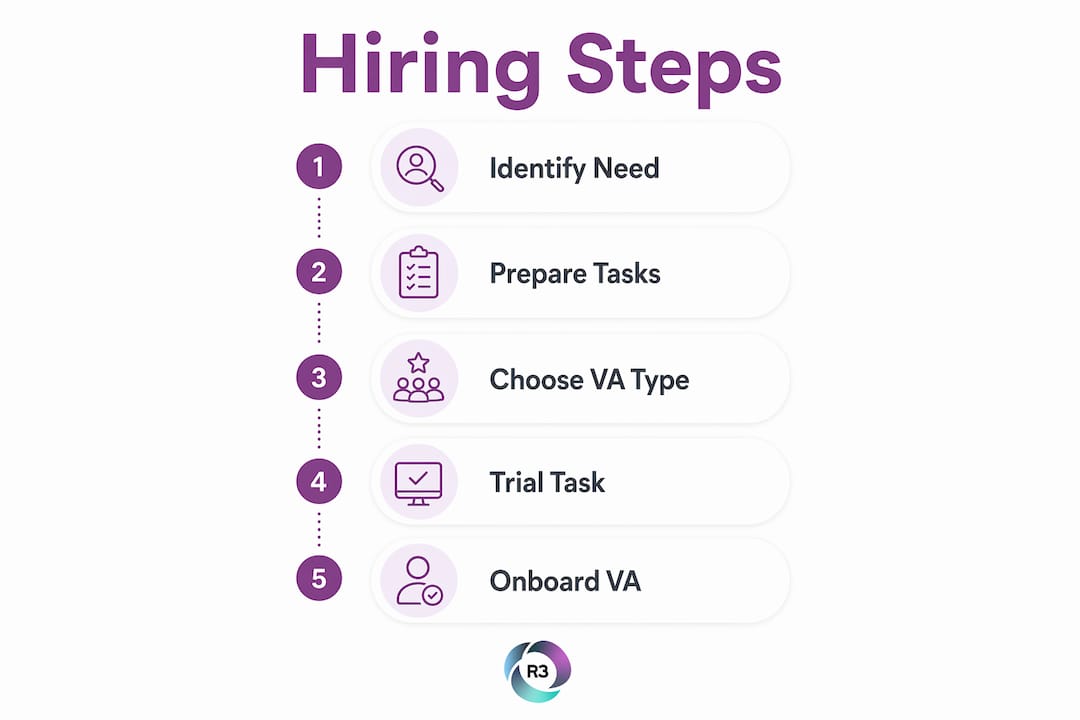
Not every VA is built for the same work. The right match depends on your task list, your budget, and how closely you need to collaborate in real time.
Factor | Administrative VA | Specialized VA |
Best for | Scheduling, email, data entry | Bookkeeping, social media, CRM |
Skill level | General | Domain-specific |
Hourly rate (US-based) | $25–$50 | $40–$75 |
Hourly rate (international) | $8–$15 | $12–$20 |
Time zone needs | Flexible | Moderate overlap required |
US-based VAs charge $25–$75 per hour; international VAs charge $8–$20 per hour. The cost difference is significant, but it does not mean international VAs deliver less quality. Many businesses use a blended model, pairing an offshore VA for routine tasks with a domestic specialist for client-facing work.
Hiring overseas requires managing time zone differences and securing at least a few overlapping hours each day for real-time collaboration. A VA in the Philippines, for example, can work a schedule that overlaps with US business hours in the morning or evening. R3source specifically sources remote professionals from the Philippines who are trained to integrate into US business workflows.
Pro Tip: Before committing to a full engagement, assign a paid trial task that mirrors your actual daily work. A candidate who asks clarifying questions instead of guessing is almost always the better hire.
Trial tasks that replicate daily duties and test for clarifying questions reduce hiring failures significantly. This single step filters out candidates who look good on paper but struggle with real-world ambiguity.
How to onboard and integrate your virtual assistant
The first 30 days of a VA relationship set the tone for everything that follows. Start with routine, objective tasks before handing off anything that requires judgment or client contact.
Delegating objective, routine tasks first helps your VA learn your communication style and preferences before taking on more complex work. Think of it as building a foundation. You are not testing their limits. You are creating shared context.
Effective onboarding looks like this:
Week 1: Assign two or three recurring tasks with clear SOPs. Focus on tasks with measurable outputs, like inbox management or scheduling.
Week 2: Add a daily or weekly check-in via Slack. Keep it short. Five minutes of alignment prevents hours of rework.
Week 3: Evaluate performance and adaptability. Did they follow the SOP? Did they flag problems early? Did they ask good questions?
Week 4: Expand the task list based on what is working. Introduce one slightly more complex task, like drafting client emails or updating CRM records.
Use your VA onboarding checklist to track progress and avoid skipping steps that matter. Recalibrate the workload every month. As trust builds, your VA can take on more, and your time opens up further.
What are the most common virtual assistant hiring mistakes?
Most VA hiring failures trace back to the same preventable mistakes. Knowing them in advance puts you ahead of the majority of first-time hirers.
“The biggest mistake business owners make is hiring a VA before they know what they need. Vague tasks produce vague results.”
Common challenges include poor communication, vague instructions, ignoring time zones, and skipping trial periods. Each of those problems is avoidable with preparation. Here is what to watch for:
Vague task definitions. “Help with marketing” is not a task. “Schedule three social media posts per week using this content calendar” is.
Hiring on price alone. The cheapest option rarely delivers the best outcome. Evaluate skills fit first, then negotiate rate.
Ignoring time zone friction. A VA with zero overlap hours creates delays that cost more time than you save.
Skipping the trial task. Resumes and interviews reveal potential. Trial tasks reveal performance.
No feedback loop. Without regular check-ins, small misalignments grow into big problems. Build feedback into the weekly routine from day one.
Learning how to interview and vet virtual assistants before you hire saves you from the most common and costly errors.
Key Takeaways
Hiring a virtual assistant at the right time, with the right preparation, is one of the highest-return decisions a business owner can make.
Point | Details |
Recognize the right signals | Routine tasks over 10 hours weekly, missed deadlines, and burnout are clear signs to hire. |
Prepare before you post | Identify 10+ tasks, create SOPs, and budget $300–$600 per month before hiring. |
Match VA type to task complexity | Use administrative VAs for routine work and specialized VAs for domain-specific tasks. |
Start delegation gradually | Assign routine tasks first to build trust before handing off strategic responsibilities. |
Avoid common pitfalls | Vague tasks, skipped trial periods, and poor time zone planning cause most VA failures. |
What I have learned from watching businesses hire their first VA
The owners who get the most from a VA are not the ones with the biggest budgets. They are the ones who did the preparation work first. I have seen businesses hand off a vague task list on day one and wonder why nothing improved. I have also seen owners who spent two weeks documenting their processes, and their VA was fully productive within the first month.
The trial task is the single most underused tool in the hiring process. Most owners skip it because it feels like extra work. It is actually the fastest way to find out if a candidate can handle real conditions, not just interview questions. A VA who asks “Should I use your brand tone here, or match the client’s style?” before completing a task is worth far more than one who guesses and delivers the wrong result.
One more thing worth saying directly: do not wait until you are completely overwhelmed to hire. The best time to bring on support is when you can still afford to train someone properly. Hiring in crisis mode leads to rushed decisions and poor fits. Hire when you see the signals, not after they have already cost you clients or sleep.
— Ellis
How R3source helps you find the right virtual assistant
R3source connects US businesses with skilled remote professionals from the Philippines who are trained to integrate directly into your operations from day one.

Whether you need administrative support, CRM management, lead generation, or customer service, R3source provides reliable, long-term staffing built around your specific workflow. The team handles sourcing, vetting, and initial training so you spend your time managing outcomes, not recruiting. If you are ready to reclaim your time and build a dependable support system, explore offshore virtual assistant services from R3source and find the right fit for your business today.
FAQ
What are the clearest signs you need a virtual assistant?
Routine tasks consuming over 10 hours weekly, missed deadlines, and personal burnout are the most reliable signals. When low-value work crowds out your highest-priority activities, it is time to delegate.
How much does it cost to hire a virtual assistant?
US-based VAs typically charge $25–$75 per hour, while international VAs charge $8–$20 per hour. Most part-time engagements run $300–$600 per month depending on hours and task complexity.
What tasks should you give a virtual assistant first?
Start with objective, recurring tasks like email management, scheduling, and data entry. These tasks have clear success criteria and help your VA learn your working style before taking on more complex work.
When is a virtual assistant necessary versus a full-time employee?
A VA is the right choice when your task demand is under 30 hours per week. Roles requiring 35 or more hours weekly or highly strategic responsibilities are better suited to a full-time employee.
How do you reduce the risk of a bad VA hire?
Assign a paid trial task that mirrors your actual daily work and test how the candidate handles ambiguity. Candidates who ask clarifying questions instead of guessing consistently outperform those who do not.
Recommended
Comments