

Virtual Assistant for Small Business: A Complete Guide


Author: Ellis Jackson
A virtual assistant (VA) is a remote professional who handles administrative, technical, or creative tasks for your business without sitting in your office. For small business owners, this model is one of the most cost-effective ways to reduce operational costs by 40% to 60% compared to hiring full-time, in-house employees. That savings comes from eliminating payroll taxes, benefits packages, and office overhead. This complete guide covers what tasks VAs handle, the real benefits they deliver, how to hire the right person, and how to manage them well once they start.
What tasks can a virtual assistant handle for small businesses?
Virtual assistants perform a wide range of administrative, technical, and creative tasks. The scope is broader than most small business owners expect, and that breadth is exactly what makes delegation so powerful.

The most commonly outsourced role is general administrative support, which covers email triage, calendar management, data entry, and document formatting. These tasks eat hours every week without generating a single dollar of revenue. Handing them off frees you to focus on client work, sales, and growth.
Beyond admin, VAs also take on:
Inbox and calendar management: Sorting emails, flagging priorities, scheduling meetings, and sending reminders
Bookkeeping support: Reconciling transactions, tracking expenses, and preparing reports for your accountant
Social media management: Writing posts, scheduling content, and monitoring engagement across platforms
Lead generation: Researching prospects, building contact lists, and managing outreach sequences
CRM management: Updating records, logging calls, and keeping your pipeline current
Customer service: Responding to inquiries, handling basic support tickets, and following up with clients
Marketing support: Drafting newsletters, editing copy, and coordinating campaigns
Specialized VAs focus on one or two of these areas and typically charge higher rates to match their depth of skill. A generalist VA handles the daily operational load. A specialist handles a specific function that requires real expertise.
Pro Tip: Spend 30 minutes auditing your last two weeks. Write down every task you did that someone else could have done with clear instructions. That list becomes your first VA job description.
What are the benefits of hiring a virtual assistant?
Hiring a VA delivers financial, operational, and personal benefits that compound over time. The most immediate impact is cost. Small businesses that replace a full-time employee with a VA save between $35,000 and $60,000 per year. That figure reflects the elimination of salary overhead, not just the hourly rate difference.
The financial case is strong, but the operational benefits matter just as much. Here is what business owners consistently gain:
Flexibility: You can scale VA hours up during busy seasons and pull back when things slow down. No severance, no awkward conversations.
Access to specialized skills: You can hire a bookkeeping VA for 10 hours a month without committing to a full-time bookkeeper.
Faster response times: A dedicated VA handles client emails and inquiries while you are in meetings or on job sites.
Reduced decision fatigue: When routine tasks are handled, your mental energy goes toward decisions that actually move the business forward.
Better work-life balance: Delegating the daily grind gives you time back. That time has real value, even if it does not show up on a balance sheet.
The benefits of hiring a virtual assistant go beyond cost savings. They create the capacity for growth that most small business owners cannot build on their own.
How to hire the right virtual assistant for your business
Hiring a VA well takes more than posting a job and picking the first applicant. A structured process protects your time and increases the odds of a long-term fit.
Step 1: Define what you need
Write down the specific tasks you want to delegate. Group them by skill type: administrative, technical, or creative. This tells you whether you need a generalist or a specialist, and it shapes every decision that follows. A detailed guide on how to hire your first VA can help you structure this step if you are starting from scratch.
Step 2: Choose your hiring model
Three main models exist for sourcing VAs. Freelance platforms connect you directly with individual contractors, giving you price flexibility but requiring more vetting on your end. Staffing agencies pre-screen candidates and handle contracts, which saves time but adds cost. Managed service providers like R3source go further by matching you with trained remote professionals, handling onboarding support, and maintaining accountability over time. Each model suits a different stage of business growth.
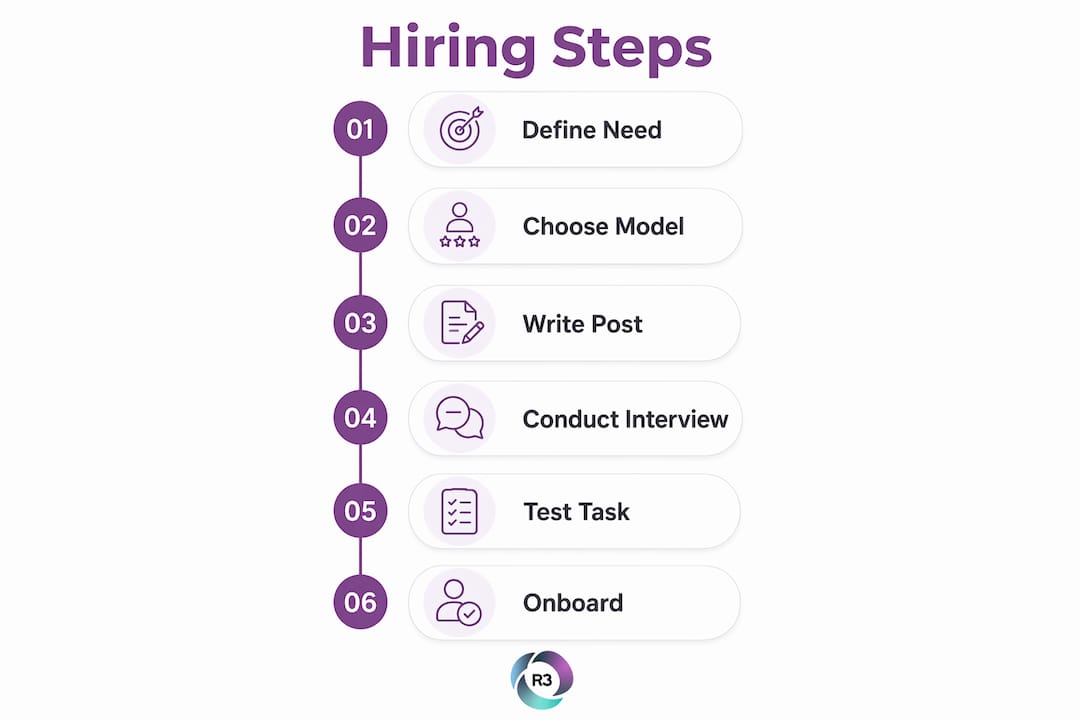
Step 3: Write a clear job post
A vague job post attracts vague applicants. List the specific tasks, the tools you use (such as Google Workspace, Slack, or your CRM), the hours per week, and the communication expectations. State your time zone and whether you need overlap hours. Serious candidates read every word.
Step 4: Interview with purpose
Ask candidates to walk you through how they would handle a real task from your list. Listen for process, not just confidence. Ask about tools they have used, mistakes they have made, and how they handle unclear instructions. The answers reveal how they think under pressure.
Step 5: Run a paid test task
A paid test task of 2–3 hours before committing confirms real output beyond what a resume or interview can show. Give the candidate a task that mirrors actual work. Evaluate the quality, the turnaround time, and how they communicated during the process. This single step eliminates most bad hires.
Step 6: Onboard with intention
A strong start prevents most early problems. Share your standard operating procedures, preferred communication style, and clear deliverables for the first 30 days. Use a structured VA onboarding checklist to cover every detail without relying on memory.
Pro Tip: Set a 90-day review milestone from day one. It gives both you and your VA a clear target and creates a natural checkpoint to adjust responsibilities.
How to manage and get the most out of your virtual assistant
Good management is the difference between a VA who performs and one who drifts. The foundation is clarity. Your VA cannot read your mind, and vague expectations produce vague results.
Effective VA management focuses on output and results rather than tracking hours. This shift in mindset matters. When you measure what gets done instead of how long someone sits at a desk, you create accountability without micromanagement.
Practical habits that keep the relationship productive:
Set weekly priorities: Share a short list of the top three to five deliverables at the start of each week. This removes ambiguity and helps your VA sequence their work.
Use a shared task system: Tools like Asana, Trello, or ClickUp give both of you visibility into what is in progress, what is done, and what is blocked.
Schedule brief check-ins: A 15-minute weekly call covers progress, blockers, and upcoming priorities. It also builds the working relationship that makes long-term collaboration work.
Give specific feedback: When something is off, say exactly what needs to change and why. Vague feedback creates confusion. Specific feedback creates improvement.
Document everything: When your VA figures out a better way to do something, capture it in a shared document. That knowledge stays with your business even if the person moves on.
As your business grows, your VA’s role can grow with it. Start with a narrow task list and expand responsibilities as trust builds. Many business owners who start with a part-time VA end up building a full remote support team over time. R3source supports that kind of growth by providing virtual assistant integration guidance as your needs evolve.
Key Takeaways
Hiring a virtual assistant is the most cost-effective way for small business owners to reclaim time, reduce overhead, and build the capacity to grow without adding full-time staff.
Point | Details |
Cost savings are significant | Small businesses save $35,000–$60,000 per year by replacing full-time roles with VA support. |
Task scope is wide | VAs handle admin, bookkeeping, social media, lead generation, CRM, and customer service. |
Hiring requires a process | Define needs, choose a model, interview well, and run a paid test task before committing. |
Management drives results | Focus on output and deliverables, not hours, and use weekly check-ins to stay aligned. |
Onboarding determines success | A structured first 30 days prevents most early problems and sets the tone for the relationship. |
What I have learned from watching small businesses hire VAs
Most small business owners wait too long to hire a VA. They wait until they are buried, and then they rush the process. That rush is where things go wrong.
The owners who get the most from their VAs are the ones who hire before the crisis hits. They bring someone on when they can still afford to train them properly, when they have the bandwidth to give feedback, and when the stakes of a slow start are manageable. Timing matters more than most people admit.
The second thing I have seen consistently is that the quality of onboarding predicts almost everything. Owners who invest two or three days in building clear processes, sharing context, and setting expectations get a productive VA within weeks. Owners who hand over a task list and disappear spend months frustrated. The VA is not the variable. The onboarding is.
One more thing worth saying plainly: the cost savings are real, but they are not the best reason to hire a VA. The best reason is focus. When you stop spending your mornings on inbox triage and your afternoons on data entry, you get to spend that time on the work that only you can do. That is where the real return lives. If you are wondering when to hire a VA, the honest answer is usually sooner than feels comfortable.
— Ellis
R3source offshore VAs: built for small business growth
R3source connects small businesses across the United States with trained remote professionals from the Philippines. These are not task-based freelancers. They are dedicated team members who integrate directly into your operations and show up consistently.
R3source covers administrative support, customer service, lead generation, CRM management, appointment setting, and marketing support. VA rates vary by experience and location, and offshore professionals from Southeast Asia typically offer strong skills at rates that fit small business budgets. Whether you need one person or a full remote team, R3source scales with you. Visit the offshore virtual assistant page to see how the model works and what it costs to get started.
FAQ
What is a virtual assistant for a small business?
A virtual assistant is a remote professional who handles administrative, technical, or creative tasks for your business. Small businesses use VAs to reduce costs and free up owner time for revenue-generating work.
How much does a virtual assistant cost?
Entry-level VAs charge between $5 and $15 per hour, while specialized or senior VAs charge $25 to $50 or more per hour. Rates vary based on skills, experience, and location.
What tasks should I delegate to a virtual assistant first?
Start with the tasks that repeat daily and do not require your direct judgment. Inbox management, calendar scheduling, and data entry are the most common first delegations for small business owners.
How do I know if a VA is the right fit before hiring?
Run a paid test task of 2–3 hours that mirrors real work. Evaluate the output quality, turnaround time, and how the candidate communicated during the task.
How is a VA different from a full-time employee?
A VA works remotely and is typically engaged on a contract or hourly basis. You do not pay payroll taxes, benefits, or office costs, which is why small businesses can save up to 60% compared to hiring in-house staff.
Recommended
Comments