

The Role of Virtual Staff in Client Onboarding


The role of virtual staff in client onboarding is to handle the administrative, mechanical, and repetitive tasks that slow down your setup process and drain your time. Client onboarding, known in operations management as the client integration workflow, is the structured sequence of steps that moves a new client from signed contract to active engagement. Virtual staff, particularly trained offshore remote professionals, execute this sequence with consistency and speed. Hiring offshore virtual support reduces operational costs by 50–70% compared to onshore staff. That cost advantage, combined with faster turnaround, makes remote staffing one of the most practical ways to scale your onboarding capacity without adding headcount to your payroll.
What specific tasks do virtual staff handle during client onboarding?
Virtual staff cover the full administrative layer of client onboarding, freeing you to focus on relationships and decisions. The tasks they manage are repeatable, time-consuming, and easy to document, which makes them ideal for delegation.
Here is what a trained virtual assistant typically owns during the onboarding process:
Document collection and intake management: Sending intake forms via tools like Jotform, tracking submissions, and following up on missing items.
Scheduling and calendar coordination: Booking kickoff calls, sending calendar invites, and confirming attendance across time zones.
CRM updates and data entry: Logging client information into platforms like HubSpot or Salesforce, tagging records, and updating deal stages.
Welcome email sequences: Sending branded welcome messages, access credentials, and next-step instructions on a defined timeline.
Reminder and follow-up sequences: Managing follow-up cadence and tone with judgment, not just automation, to avoid overwhelming new clients.
SOP execution: Following documented standard operating procedures to deliver a consistent experience for every client, regardless of who is handling the file.
The last point matters more than most business owners expect. Client onboarding is part of the product experience, and it requires the same polish you would apply to your core service. A virtual assistant who follows a well-built SOP delivers that polish every time.
Pro Tip: Build your onboarding SOP as a step-by-step checklist inside a shared project management tool like Asana or ClickUp. Your virtual assistant can check off each step in real time, giving you full visibility without requiring you to ask for updates.

How does delegation to virtual staff accelerate client onboarding?
Delegation to virtual staff cuts onboarding time significantly. Onboardings that take 5–8 hours for an advisor working alone can be completed in 2–3 hours by a trained virtual assistant. That time reduction compounds across every new client you bring on.
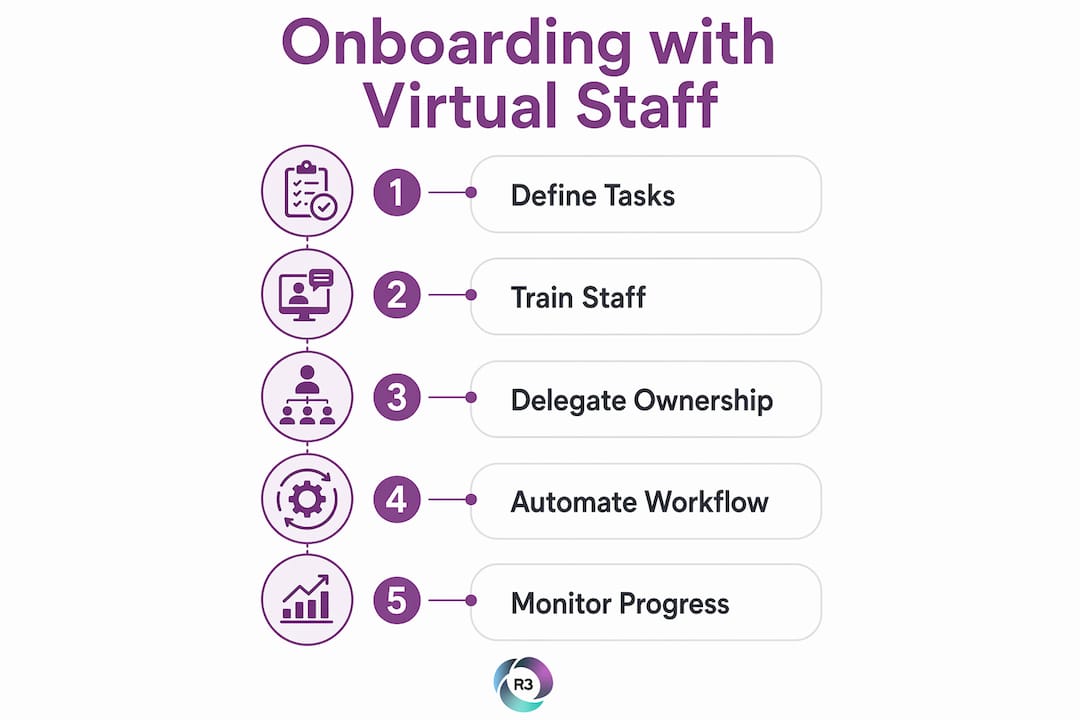
The acceleration comes from two sources: automation and task ownership. When your virtual assistant owns the checklist and runs the process, you stop being the bottleneck. Standardized VA systems reduce active onboarding time per new client to 15–20 minutes of your time, focused on review and personalization only. The rest runs without you.
The phased delegation model is the most reliable way to get there. It works in three stages:
Phase | Duration | What the VA owns |
Shadowing | Week 1 | Observes and documents your current process |
Supervised execution | Weeks 2–3 | Runs tasks with your approval before sending |
Full ownership | Week 4 onward | Executes independently with weekly check-ins |
Phased delegation transitions from supervised tasks to full ownership over 3–4 weeks, with weekly status updates replacing daily micromanagement. That structure protects quality while building trust in the process.
“Speed to first contact increases retention. Outsourcing intake to virtual staff enables 24/7 responsiveness and avoids missed leads. Prospective clients who engage within minutes show higher retention rates than those who wait hours for a response.”
The responsiveness advantage is real. Outsourcing intake improves lead conversion through structured qualification workflows and faster first contact. Your virtual assistant can respond to a new inquiry at 9 PM on a Friday. You do not have to.
Pro Tip: Track your average onboarding time per client before and after delegating to a virtual assistant. Most business owners see a reduction within the first 30 days. That number becomes your clearest ROI proof point when evaluating the investment.
What are key best practices for integrating virtual staff into onboarding workflows?
Effective integration of virtual staff into your onboarding process requires structure before speed. The most common mistake is handing off tasks without documented workflows. Your virtual assistant can only perform as well as the system you give them.
Follow these steps to build a reliable integration:
Document your current process first. Map every step from signed contract to active client. Identify which steps require your judgment and which are purely administrative.
Build SOPs for every repeatable task. Write them in plain language with screenshots or screen recordings. A virtual assistant onboarding checklist gives your remote staff a clear reference point for every client file.
Assign a strict split of duties. Virtual staff handle document collection, scheduling, CRM updates, and reminder sequences. You handle pricing conversations, scope changes, and any client dispute. Mismanaging this split creates onboarding friction and erodes client trust.
Set escalation protocols. Define exactly when your virtual assistant should flag a stalled client to you. A structured onboarding sequence escalates automatically after three unanswered reminders to prevent client fatigue.
Align communication tone with your brand. Review your virtual assistant’s first 10 client emails before they send independently. Tone consistency is what makes the experience feel like your business, not a third party.
Schedule weekly, not daily, check-ins. Daily check-ins create bottlenecks and signal a lack of trust. Weekly reviews with a shared status report keep you informed without slowing the process down.
The split of duties principle deserves extra attention. You should maintain all client-facing conversations involving pricing, scope, or disputes personally. Virtual staff handle routine admin while managers own relationship-building and sensitive decisions. That boundary protects both the client relationship and your business reputation.
Pro Tip: Record a short Loom video walkthrough of your onboarding process and share it with your virtual assistant during the shadowing phase. Video context reduces misunderstandings faster than written SOPs alone.
What technology and automation tools enhance virtual staff effectiveness in onboarding?
The right tools multiply what your virtual assistant can accomplish. Without them, your remote staff is still doing manual work that automation could handle in seconds.
Automation platforms like Make, PandaDoc, and Jotform enable end-to-end onboarding automation including contract generation, folder creation, and task setup. These tools reduce manual steps from hours to minutes with high configurability. Your virtual assistant manages the exceptions and personalizations. The platform handles the repetitive execution.
Here is how each tool fits into the onboarding stack:
Jotform: Collects intake data through branded forms. Triggers the next step automatically when a client submits.
PandaDoc: Generates and sends contracts from templates. Tracks signature status and notifies your virtual assistant when a document is signed.
Make (formerly Integromat): Connects your tools through conditional workflows. When a contract is signed in PandaDoc, Make can create a client folder in Google Drive, add a CRM record in HubSpot, and send a welcome email, all without manual input.
HubSpot or Salesforce: Stores all client data, tracks onboarding stage, and logs every communication. BPO virtual assistants integrate playbooks and SOPs with role-based access across these platforms for quality and security.
Slack: Keeps your virtual assistant connected to your team for real-time updates and escalation alerts.
Conditional branching workflows are the most underused feature in this stack. When a client selects a specific service type on your intake form, Make can route them to a different onboarding sequence automatically. Your virtual assistant receives a task tailored to that service type, not a generic checklist. That level of personalization at scale is what separates a polished onboarding experience from a generic one.
Key Takeaways
Virtual staff reduce onboarding time, cut operational costs, and deliver a consistent client experience when given clear SOPs, the right tools, and a defined split of duties.
Point | Details |
Cost and time savings | Offshore virtual staff cut operational costs by 50–70% and reduce onboarding time from hours to minutes. |
Phased delegation works | Transition from supervised tasks to full VA ownership over 3–4 weeks for reliable, quality results. |
Split duties clearly | Virtual staff own admin tasks; managers own pricing, scope, and dispute conversations. |
Automation multiplies output | Tools like Make, PandaDoc, and Jotform eliminate manual steps and trigger workflows automatically. |
Escalation prevents fatigue | Define when your VA escalates a stalled client to you, and build that trigger into your SOP. |
What I have learned about virtual staff and onboarding after years of watching businesses get it wrong
Most business owners delegate too late or too little. They wait until they are drowning in admin before they hand anything off, and by then the process is chaotic and undocumented. That makes the handoff harder and the results worse.
The businesses that get the most value from offshore virtual assistants treat onboarding as a product, not a chore. They document the process before they hire, not after. They build the SOP first, then bring in the virtual assistant to run it. That sequence changes everything.
The other mistake I see constantly is over-delegating sensitive client interactions. A virtual assistant should never be the one telling a client their project is delayed or their invoice has an error. Those conversations require judgment, relationship capital, and authority. When a VA handles them without the right context, clients feel like they are talking to a call center. That feeling is hard to recover from.
The phased delegation model is not just a training tool. It is a trust-building framework for both your virtual assistant and your clients. Give it the full 3–4 weeks. Resist the urge to hand everything off in week one. The patience pays off in a process that runs without you and still feels personal to the client.
The skills your virtual assistant brings to onboarding matter as much as the tools you give them. Hire for judgment and communication ability, not just task completion speed.
— Ellis
How R3source supports your client onboarding from day one
R3source provides trained offshore virtual assistants from the Philippines who integrate directly into your onboarding workflows. Each remote professional is matched to your business type and briefed on your processes before they start.
R3source’s offshore virtual assistant services cover document collection, CRM management, scheduling, follow-up sequences, and SOP execution. You get a dedicated team member, not a rotating pool of freelancers. Engagement models are flexible, which means you reduce overhead without committing to a full-time hire before you are ready. If you want to see how this works for your specific onboarding process, a free consultation with the R3source team is the fastest way to get a clear picture.
FAQ
What is the role of virtual staff in client onboarding?
Virtual staff handle the administrative and repetitive tasks in client onboarding, including document collection, CRM updates, scheduling, and follow-up sequences. This frees business owners to focus on relationship-building and strategic decisions.
How much time can a virtual assistant save during onboarding?
A trained virtual assistant reduces active onboarding time per client to 15–20 minutes for the business owner, down from several hours, by owning the checklist and running the process independently.
What tasks should a manager never delegate to virtual staff during onboarding?
Managers should retain all conversations involving pricing, scope changes, and client disputes. Virtual staff handle routine admin; managers own sensitive, relationship-critical interactions.
How long does it take to integrate a virtual assistant into an onboarding workflow?
The phased delegation model takes 3–4 weeks, moving from shadowing to supervised execution to full task ownership, with weekly check-ins replacing daily oversight.
What tools work best for virtual staff managing client onboarding?
Make, PandaDoc, Jotform, HubSpot, and Slack form a reliable onboarding stack. These platforms automate contract generation, intake collection, CRM updates, and team communication with minimal manual input.
Recommended
Comments