

Owners Get a Trained Agent in 30 Days: Customer Support QA Outsourcing

Outsourcing customer support makes sense once your team spends more time answering repetitive tickets than growing the business, and the recommended starting point for most small and mid-sized companies is a hybrid model: offshore agents for back-office, email, and chat work, paired with nearshore or onshore coverage for US-facing voice calls. From there, the real work is evaluation, onboarding, and quality assurance. Both are covered below.
Offshore agents are most suitable for back-office, email, and chat support due to lower costs and flexible response times, whereas voice support benefits from nearshore or onshore agents for better accent and time-zone compatibility.
Continuous governance, quality assurance, and proper onboarding are essential to prevent quality drift and ensure remote support teams perform at the same standards as in-house staff.
Total ownership costs include management, training, QA tools, turnover, and ramp-up periods, which can outweigh the benefits of lower hourly rates if not managed carefully.
Successful outsourcing requires explicit SLAs with response times, CSAT targets, and performance reviews within the first 90 days, as initial gains often fade without ongoing management.
Long-term dedicated staff outperform freelancers by maintaining institutional knowledge, improving quality scores over time, and forming more reliable customer relationships.
Table of Contents
What Does Customer Support QA Outsourcing Actually Mean?
Customer support QA outsourcing, in the sense that matters to you as a business owner, means hiring managed remote customer service representatives and virtual assistants as long-term, dedicated staff who plug directly into your existing operations. It is not a task-by-task freelance arrangement, and it is not a call center that rotates a new voice onto your account every few weeks. The “QA” part refers to the quality assurance layer, scoring calls, auditing tickets, tracking CSAT, that keeps that remote team accountable to the same standards as an in-house hire.
The distinction matters because outsourcing done well behaves like hiring, not renting. You are building a support system with people who learn your product, your tone, and your edge cases over months, not days. Zendesk’s outsourcing guide frames this correctly: outsourcing improves scalability and brings in specialized expertise, but it only works long-term with active governance and quality checks. Skip the governance, and you get a support desk that looks fine on paper and frustrates customers in practice.
For owners weighing this option, the appeal is straightforward. You reduce payroll overhead, add coverage hours without hiring shift by shift, and free up your time to work on revenue instead of refunds. The risk, and it is real, is quality drift if you treat outsourcing as something you set up once and never revisit.
Which Outsourcing Model Fits Your Support Channels?
Onshore means agents working in your own country, nearshore means a neighboring region with overlapping time zones, and offshore means a location further away, commonly the Philippines or similar markets, where labor costs are meaningfully lower. Each model solves a different problem, and picking the wrong one for a given channel is one of the most common mistakes owners make.
Voice support tends to perform best with nearshore or onshore agents because live calls depend on real-time accent familiarity and time-zone overlap. Callforce’s model comparison notes that nearshore often delivers 40 to 60 percent cost savings over onshore while keeping that overlap intact, which is why it has become the default for US-facing phone support. Email, chat, and back-office work, on the other hand, tolerate offshore delivery well because response windows are more flexible and tone matters less than accuracy and speed.
Here’s how the trade-offs typically break down:
Onshore: Highest cost, easiest cultural fit, best for complex or compliance-heavy voice work.
Nearshore: Moderate cost, strong time-zone overlap, well suited to US voice support.
Offshore: Lowest cost, wider labor pool, ideal for email, chat, CRM management, and back-office tasks.
Hybrid: Combines offshore for volume work with nearshore or onshore for voice, giving you cost control without sacrificing call quality.
Most growing companies land on hybrid within their first year, once they see which channels actually need a live, accent-matched voice on the phone.
What Does Outsourced Support Actually Cost?
Hourly rates vary widely by model, and the sticker price rarely tells the whole story. Offshore agents typically run the lowest hourly bands, nearshore sits in the middle, and onshore commands the highest rates, largely reflecting local cost of living and compliance requirements. Callforce’s cost breakdown lays out these bands clearly, and the gap between offshore and onshore rates can be substantial enough to change your entire staffing math.
Statistic Callout: Nearshore support often saves companies 40 to 60 percent compared to onshore staffing while preserving the time-zone overlap voice programs need.
The hourly rate is only one line in the total cost of ownership, though. You also need to budget for:
Management time spent reviewing tickets, calls, and QA scores each week.
Training hours during ramp, typically two to four weeks before an agent reaches full productivity.
QA tooling and any AI-assisted scoring software.
Turnover and retraining costs, since attrition data shows offshore contact centers can churn faster than onshore teams if management is thin.
A rock-bottom hourly rate that comes with high turnover often costs more over a year than a slightly pricier vendor with staff who stay. Budget generously for the ramp period, and expect steady-state costs to drop once an agent is trained and independent.
How Do You Evaluate and Hire the Right Team?
Hiring managed remote support staff works best when you treat it like hiring a full-time employee, not shopping for a vendor contract. Run every candidate or provider through the same structured process you would use internally, and don’t skip the live test.
Screen for skills and cultural fit. Look for clear written and spoken English, prior experience in your industry if possible, and references you can actually call.
Check tech stack compatibility. Confirm the agent or provider can work directly inside your CRM, help desk, and phone system rather than a separate tool you have to reconcile later.
Run a task-based test. For voice roles, have candidates handle a mock angry-customer call. For chat and email, give them a sample ticket queue and review tone, accuracy, and speed.
Set SLA basics before signing anything. Your contract should specify first response time (FRT) targets, resolution time windows, a CSAT threshold, a QA sampling rate (what percentage of interactions get reviewed weekly), and clear escalation timelines for unresolved issues.
Watch for red flags. Vague reporting, reluctance to share references, and pressure to sign long contracts before a trial period are all reasons to walk away.
Pro Tip: Ask any candidate or provider to walk you through how they would handle a refund request from an angry customer. The answer tells you more about judgment and tone than any resume line.
A sample SLA worth borrowing: FRT under 2 hours for email, under 60 seconds for chat, CSAT target of 90 percent or higher, and 10 to 20 percent of interactions QA sampled weekly during the first 90 days.
How Do You Onboard and Train Outsourced Agents?
Onboarding is where most outsourcing relationships succeed or quietly fail. The U.S. Department of Labor’s remote work guidance makes a point that applies directly here: remote work only holds up with documented processes and formal management. Nothing informal, no “just ask around” culture, survives a distributed team.
Start with these essentials:
Grant system access (CRM, help desk, phone, internal chat) on day one, not week two.
Build a searchable knowledge base covering policies, tone guidelines, and common ticket types.
Record product walkthroughs instead of relying on live demos that only happen once.
Provide scripted responses for your ten most common issues, with room for agents to personalize.
Async-first documentation matters more than most owners expect. If a process only lives in your head, it effectively doesn’t exist for a remote hire on the other side of the world. Write it down, record a short video, and store both somewhere every agent can find without asking.
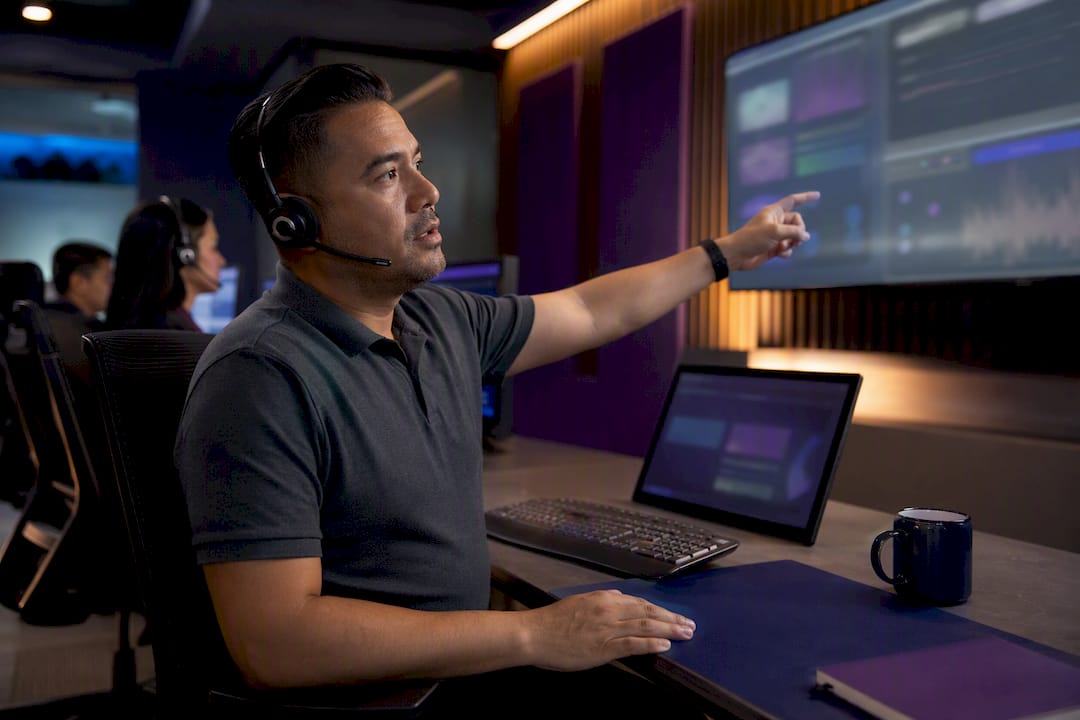
Quality assurance should run on a cadence from week one, not after problems surface. Sample a percentage of calls and tickets weekly, and lean on AI-assisted QA tools that can evaluate larger volumes of conversations and flag coaching opportunities your team would otherwise miss. Platforms like Orphora AI and OffBook specialize in this kind of automated conversation scoring, which makes weekly coaching loops far less time-consuming to run manually.
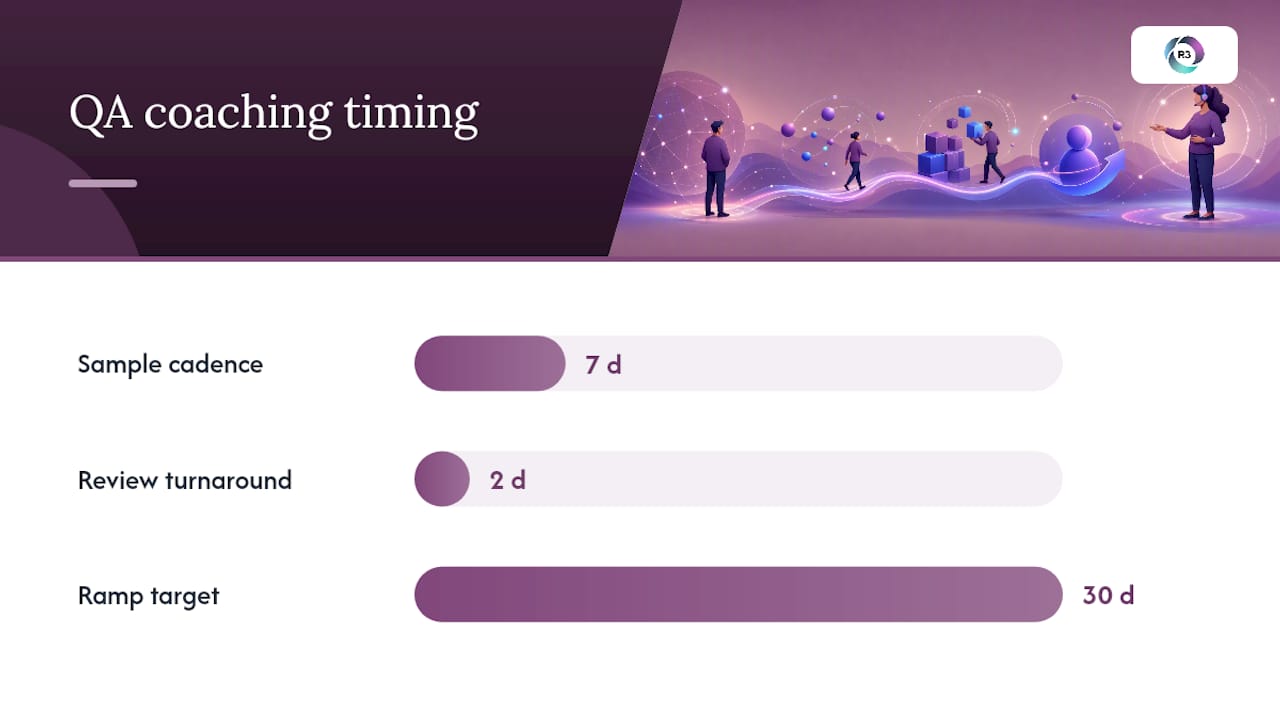
Pro Tip: Review QA scores with each agent within 48 hours of the sampled interaction. Feedback loses most of its value once the agent has moved on to fifty more tickets.
Measure training effectiveness by tracking how quickly new agents hit your CSAT and FRT targets. If ramp consistently takes longer than a month, the gap is usually in your documentation, not the agent.
How Do You Manage Performance Once the Team Is Running?
Ongoing management is lighter than onboarding, but it can’t disappear entirely. A short daily or weekly sync, 15 to 30 minutes, keeps remote agents aligned on priorities and gives them a channel for questions that would otherwise pile up unanswered.
Track a small dashboard of numbers rather than drowning in metrics:
First response time (FRT) and resolution time by channel.
CSAT score, reviewed weekly against your SLA target.
Ticket backlog, which flags capacity problems before customers notice.
QA score trends per agent, not just team averages.
Attrition, since a rising churn rate is often the earliest warning sign of a management gap.
Statistic Callout: Offshore contact center attrition rates can run high without deliberate retention effort, which is exactly why total cost of ownership needs to include retraining costs, not just hourly rates.
Escalation paths need to be explicit and written down. Decide in advance which issues an agent handles solo, which get flagged to a team lead, and which come straight to you. Ambiguity here is what causes a frustrated customer to sit in limbo for two days.
Retention matters more than owners expect going in. Dedicated remote staff who feel like part of the team, recognized, given growth paths, included in wins, stay longer and perform better than agents treated as interchangeable seats. Our guide to remote team management covers practical rhythms for keeping distributed staff engaged over the long run.
What Goes Wrong With Outsourced Support and How Do You Prevent It?
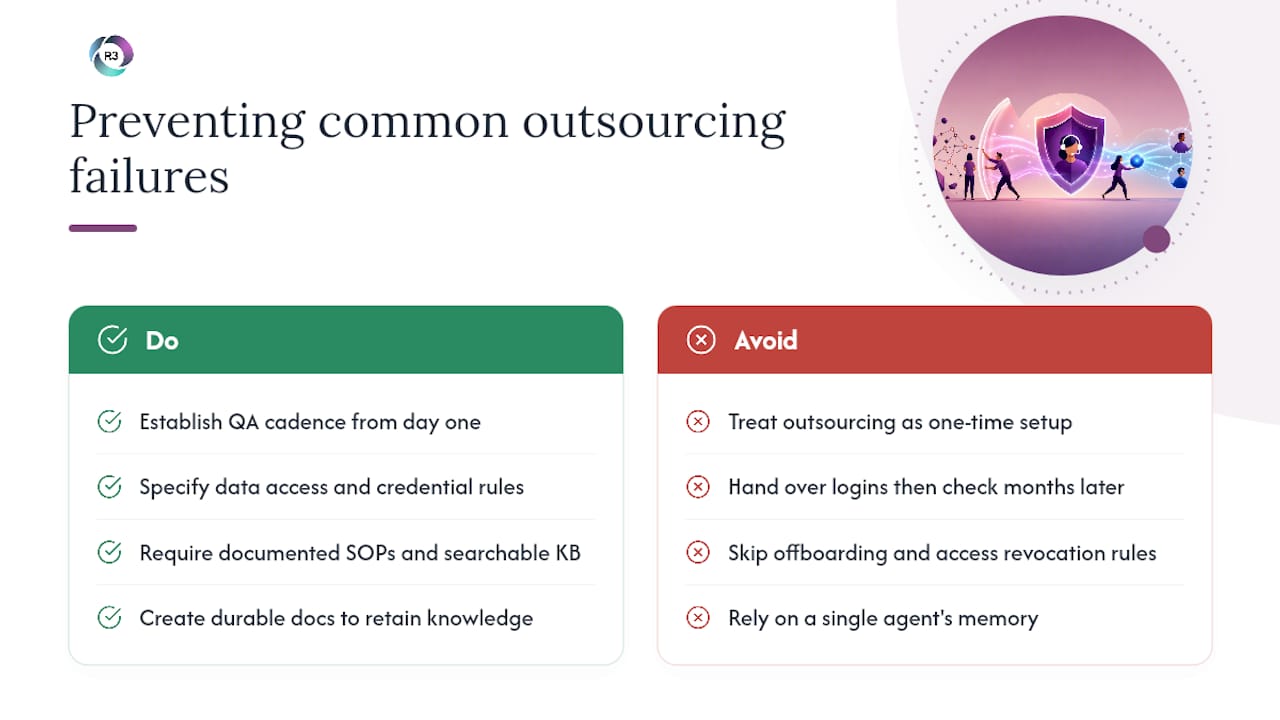
The most common failure mode is treating outsourcing as a one-time setup instead of an ongoing relationship. Owners hire a team, hand over a login, and check back in three months later, by which point quality has usually drifted and nobody flagged it. The fix is a QA cadence from day one, not a fire drill after complaints start.
Data security is the second recurring risk. Outsourced agents often need access to customer records, payment details, or health information, so your vendor agreement should specify who can access what, how credentials are managed, and what happens to data access when an agent leaves the account. Ask any provider directly how they handle offboarding, not just onboarding.
Communication gaps cause the third category of problems. Time-zone differences, language nuance, and simple distance can create misunderstandings that would never happen with an in-house hire sitting three desks away. Documented SOPs and a searchable knowledge base close most of this gap, but they only work if someone updates them when your product or policy changes.
Finally, attrition undermines quality faster than owners expect. A departing agent takes weeks of tacit product knowledge with them, and if your onboarding materials live only in that person’s head, you start over. Building durable documentation, not relying on any single agent’s memory, is the single best insurance against this. Our post on offshore team productivity strategies walks through several ways to keep institutional knowledge inside the system rather than inside one person.
How Should Your Systems Connect With a Remote Team?
Technology integration decides whether an outsourced team feels like an extension of your business or a separate operation you have to manage twice. The goal is simple: your remote agents should work inside the same CRM, help desk, and phone system your in-house staff already use, not a parallel setup you reconcile later.
Before onboarding anyone, confirm your provider can support your existing stack. Most modern help desks and CRMs support role-based access, so agents see only what their role requires, customer records and ticket history, without exposure to financial systems or admin settings.
Integration also covers reporting. Your dashboards should pull data automatically from wherever agents work, rather than requiring anyone to compile numbers manually at the end of the week. Automated QA and coaching tools, the kind used by providers like OffBook, plug directly into call and chat logs to score interactions without extra manual work from you or your remote lead.
If your provider suggests you switch platforms entirely to fit their preferred tools, treat that as a caution flag. The stronger setup is one where the remote team adapts to your systems, not the other way around. Our guide on tools for managing remote assistants covers specific integration options worth reviewing before you sign a contract.
What Does a Successful Outsourcing Rollout Look Like?
The clearest way to judge whether outsourced support works is to look at what happens after the first ninety days, not the first week. Early wins usually show up as fewer overdue tickets and shorter response times, but the real test is whether quality holds steady six months in, after the initial enthusiasm fades on both sides.
One useful pattern shows up in how Brent Crawley scaled his business with a dedicated remote support team. The shift wasn’t just adding headcount, it was replacing scattered, reactive support with a team that had documented processes and clear ownership over specific channels. That kind of structural change tends to matter more than the raw number of agents added.
Successful rollouts share a few traits regardless of industry. The business owner stays involved in QA reviews for the first month rather than delegating entirely from day one. Documentation gets built before agents start, not scrambled together after the first confusing question. And metrics get tracked from week one, so drift shows up as a number on a dashboard instead of a pattern of complaints nobody noticed until it was a problem.
The pattern that fails, by contrast, is hiring fast and managing slow. Owners who treat the first outsourced hire as “hands off, no calls needed” tend to see quality slip within the first two months, right around when the initial training fades and nobody’s checking the QA scores.
Why Dedicated Remote Staff Beats the Freelancer Model
The conventional advice tells owners to start small with a freelancer or a task-based contractor. That works for a one-off project, but customer support isn’t a project, it’s an ongoing relationship with your customers, and relationships need continuity. High-attrition BPO floors and rotating freelancers both break that continuity in the same way: institutional knowledge walks out the door constantly, and you rebuild from scratch every few months.
Dedicated long-term staff solve this because they stay long enough to learn your product’s edge cases, your customers’ patterns, and your tone. That’s the model R3source builds around: agents integrated into your actual workflows, your CRM, your knowledge base, your escalation paths, not a call center handling your account as one of fifty others. Owners we’ve worked with consistently see the difference show up in QA scores that improve over months rather than staying flat.
— Ellis
How Do You Get Started With R3source?
R3source is the alternative to piecing together freelancers or gambling on a high-turnover call center. You get one dedicated, trained agent who learns your business and stays, not a rotating cast pulled from a shared floor.
An introductory consultation starts with a conversation about your channels, ticket volume, and where your team is currently stretched thin. From there, we map out which role, customer service, back-office, or a blended position, fits your operation best, and walk through realistic timelines for onboarding and ramp. Most clients see a trained, independent agent handling core ticket volume within the first month.
What sets R3source apart is accountability paired with integration. Your agent works inside your existing CRM and help desk, follows documented SOPs built around your business, and gets ongoing QA coaching, not a one-time training session and radio silence. If you’re ready to see whether a dedicated offshore support hire fits your operation, book an introductory consultation and bring your current pain points to the call.
Sources
Recommended
Comments