

Protect One Focus Block With VAs: Efficient Work Habits for Pros


Efficient work habits are repeatable routines that protect one daily focus block, set three priorities, and hand off recurring tasks instead of doing everything yourself. The highest-impact habits are priority setting, protected focus time, batching, real breaks, and delegation. Start today by writing down tomorrow’s single top priority before you close your laptop tonight.
TL;DR:
Most effective work habits focus on setting three priorities daily, blocking focused work time, and batching administrative tasks to reduce decision fatigue.
Building habits requires starting small, attaching behaviors to existing routines, tracking progress visibly, and scaling only after consistent effort over two weeks.
Protect your peak energy hours by scheduling cognitively demanding tasks early and batching meetings or admin tasks during lower-energy periods.
Delegating routine, repeatable tasks with documented procedures and regular check-ins frees mental bandwidth and prevents overwhelm.
Using virtual assistants to handle inbox management, scheduling, and follow-ups ensures core habits are maintained even when personal bandwidth is limited.
Table of Contents
High-Impact Work Habits Worth Building First
Efficient work habits share one trait: they reduce the number of decisions you make under pressure. Most professionals don’t lose time to laziness. They lose it to reactivity, answering whatever pings loudest instead of working on what actually matters. The habits below fix that, and each one comes with a single action you can try tomorrow.
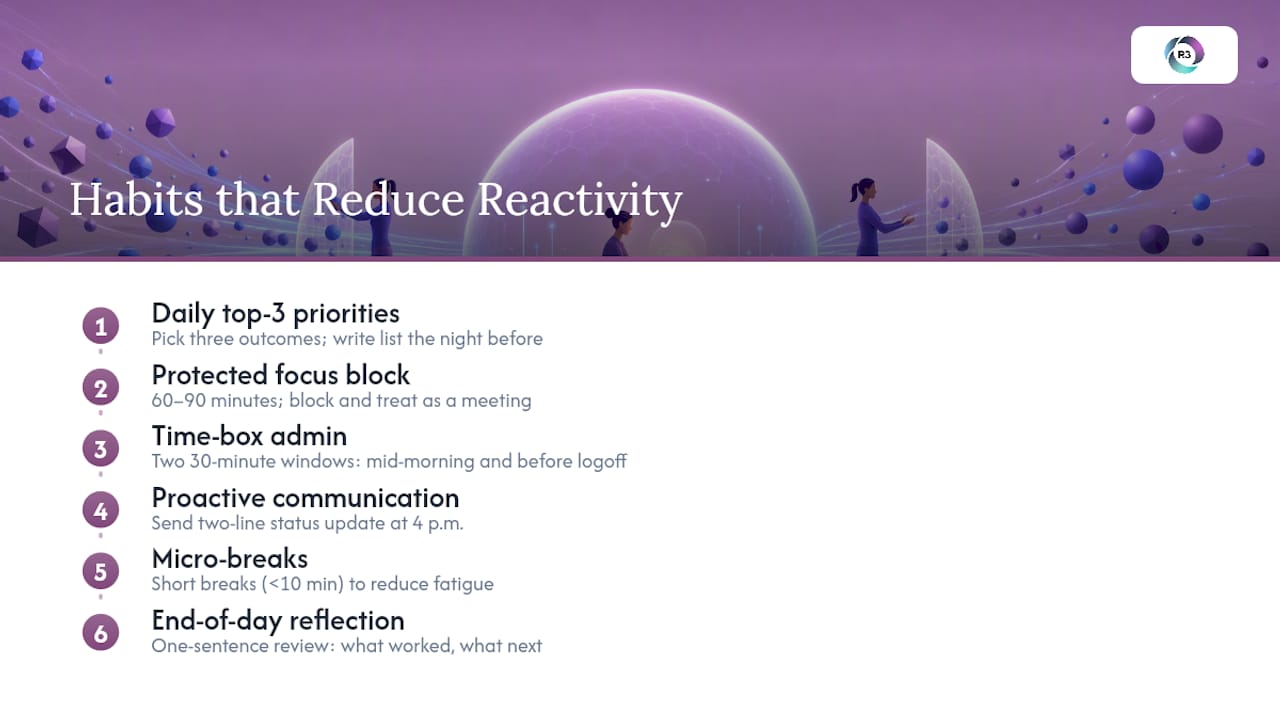
Daily top-3 priority setting. Pick three outcomes for the day, not tasks. “Finalize the Q3 proposal” beats “work on proposal.” Writing this list the night before, rather than the morning of, removes the temptation to let your inbox set your agenda. Try this template: “Today succeeds if I finish A, make progress on B, and don’t drop C.”
One protected 60 to 90 minute focus block. Practitioner research consistently points to uninterrupted, cognitively demanding work as the highest-leverage productivity habit available to knowledge workers. Block it on your calendar, label it something boring like “Working,” and treat it the way you’d treat a client meeting. Nobody double-books a client meeting.
Time-boxing and batching admin. Email, Slack, and expense reports expand to fill whatever time you give them. Cap admin to two 30-minute windows daily, one mid-morning and one before you log off. This isn’t about ignoring messages; it’s about answering them in a batch instead of letting them fragment your attention all day.
Proactive communication. A two-line status update sent at 4 p.m. often eliminates the “quick sync” meeting your manager was about to schedule.
Micro-breaks and real breaks. A systematic review covering 22 study samples found that breaks of 10 minutes or less measurably increase vigor and reduce fatigue, though the effect on aggregated performance metrics was smaller and not statistically significant on its own. The takeaway isn’t that breaks make you instantly more productive. It’s that they keep you from running on empty by hour six.
End-of-day reflection. Close each day with one sentence: “What worked, what didn’t, what carries to tomorrow.” It takes 90 seconds and prevents the Sunday-night dread of not knowing where last week went.
None of these habits are complicated. What’s hard is doing them consistently when your calendar is already full, which is exactly what the next section addresses.
How Do You Build a New Work Habit That Actually Sticks?
Most habit attempts fail not because the habit is wrong, but because it starts too big. Behavioral scientist BJ Fogg’s tiny-habits research found that habits paired with an existing routine and shrunk down to require almost no willpower succeed far more often than ambitious overhauls. Here’s a practical sequence for turning any habit from this article into a permanent behavior.
Shrink it to the smallest useful version. Don’t commit to “90 minutes of deep work daily.” Commit to 15 minutes, right after your morning coffee. Scale up only once the smaller version feels automatic.
Attach an if-then rule. Implementation intentions work because they remove the moment of decision. “If it’s 9 a.m., then I close Slack and open my priority doc” is far more durable than a vague intention to “focus more.”
Stack the new habit onto one you already have. Habit stacking links the new behavior to something already wired into your day, like reviewing your top-3 list right after you pour that same morning coffee.
Design the cue, then remove friction. Put a recurring calendar block on your screen, close unrelated tabs before it starts, and silence notifications automatically rather than relying on memory.
Track it visibly and aim for roughly 80% consistency, not 100%. A simple checkmark on a wall calendar or a habit-tracking app works. Missing one day out of five isn’t failure; it’s normal variance.
Scale up only after two consistent weeks, and add an accountability partner, such as a colleague who checks in weekly, if the habit involves other people’s cooperation.
Habits don’t exist in isolation. A performance-habits framework synthesizing research across sleep, movement, and productivity found that habits work by automating routine behavior, which frees up cognitive resources for the decisions that actually require your judgment. That’s the real payoff: not just saving time, but saving mental bandwidth.
Pro Tip: Never launch more than one new habit at a time. Stacking three new routines in the same week is the single most common reason people abandon all three by week two.
Schedule Around Your Energy, Not Just Your Calendar
Most people schedule by availability. Efficient professionals schedule by cognitive demand instead, matching hard tasks to the hours their brain actually works best.

Track your energy for three days: note when you feel sharpest (usually mid-morning for most people, though this varies) and when you hit a slump (often right after lunch). Once you know your pattern, protect the peak window for your hardest work and use the low window for admin, email, or meetings that don’t require original thinking.
A practical time-block template looks like this:
8:00 to 9:30 a.m.: Protected focus block, hardest task of the day
9:30 to 10:00 a.m.: Admin batch (email, quick replies)
10:00 a.m. to noon: Meetings, clustered together rather than scattered
1:00 to 2:00 p.m.: Second focus block or lower-demand deep work
4:30 to 5:00 p.m.: Admin batch two, end-of-day reflection
Clustering meetings into set windows, rather than letting them puncture your day at random, is a habit practitioners consistently recommend for protecting the blocks around them. Time-boxing techniques including the Pomodoro method also support this, using structured intervals of 25 to 90 minutes to maintain concentration before it drops off.
A meta-analysis of time management interventions found a moderate positive effect on job performance and an even stronger effect on well-being and life satisfaction, meaning the payoff from better scheduling shows up in how you feel about work, not just how much you produce.
On break timing, a NIOSH field study at a meat-processing plant found that a schedule of longer, less frequent 9-minute breaks improved worker discomfort ratings compared to more frequent 3-minute breaks, without hurting output. Longer, well-spaced breaks tend to beat frequent short interruptions. On the “hardest task first” question, individual differences matter more than any universal rule: some people do their best thinking at 7 a.m., others hit their stride after 2 p.m., so build your schedule around your own data, not someone else’s routine.
Daily Micro-Habits You Can Start This Week
Small, specific rituals beat vague intentions. Try these four templates, all under five minutes each.
Morning Priority Reset (1 to 5 minutes): Before opening email, write your top three outcomes for the day on a sticky note or the first line of your notes app. Set a recurring 8:00 a.m. calendar reminder titled “Priority Reset” so it happens automatically.
Pre-meeting intention (30 to 60 seconds): Before joining any call, write one line: “The outcome I need from this meeting is ___.” It sharpens your questions and shortens the meeting.
Admin batching window: Set two recurring calendar blocks, 10:00 a.m. and 4:30 p.m., labeled “Admin Batch.” Most calendar tools let you color-code these so they’re visually distinct from focus blocks.
End-of-day reflection: One sentence: “Today I finished ___, tomorrow’s first priority is ___.” Pair it with a Friday five-minute weekly check-in asking what habit stuck and what didn’t.
For your first week, try one micro-habit per day rather than all four at once: Monday is the Priority Reset, Tuesday adds pre-meeting intentions, Wednesday adds admin batching, Thursday adds end-of-day reflection, and Friday is your check-in.
Why Work Habits Stall (and How to Recover)
Habits usually fail for three predictable reasons: too many started at once, the first version was too ambitious, and the plan relied on motivation instead of a cue. When a habit stalls, shrink it back to the smallest version that felt easy, and re-anchor it to a cue that hasn’t changed, like your first coffee or your commute.
If a habit requires teammates’ cooperation (like clustering meetings), phase it in for your own calendar first, then invite one collaborator before rolling it out broadly.
After missed days, don’t restart with a bigger version to “make up for it.” Research on habit formation consistently favors resuming at the same small scale rather than escalating out of guilt.
If a habit still isn’t working after three honest attempts at a smaller version, the tactic is likely wrong for your role, not your willpower. Swap it rather than force it.
Pro Tip: Missing two days in a row is the highest-risk moment for abandoning a habit entirely. Treat day three as non-negotiable, even in a five-minute version.
Where Delegation Fits Into an Efficient Work System
Protecting a focus block only works if fewer things compete for your attention in the first place. That’s where delegation earns its place in an efficient system: every recurring, rule-based task you hand off is one less decision draining your limited daily bandwidth.
Good candidates for delegation share three traits: they’re repeatable, measurable, and don’t require your unique judgment. Inbox triage, calendar management, CRM data entry, appointment setting, and routine client follow-ups all qualify. Document each as a simple SOP before handing it off, and build in a short reporting cadence (daily or weekly check-ins) so the habit you delegate gets executed reliably, not just once.
Inbox and calendar management
CRM updates and lead follow-up
Appointment setting and scheduling
Recurring reporting and data entry
Customer service responses for common questions
Delegation failures are usually process failures, not hiring failures. A documented SOP and a two-week ramp-up with daily check-ins fix most of what goes wrong when handing off a task for the first time. Explore more on managing remote assistants and offshore team productivity strategies for practical frameworks.
What Actually Works With Real Teams
Habits fail less from bad intentions and more from bad scaffolding. In practice, professionals who protect one focus block and delegate the admin around it save more real hours than those who try to optimize every minute of the day. The most underused habit here isn’t the focus block. It’s the two-line status update that quietly cancels a meeting nobody wanted anyway. Pick one habit from this article and commit to it for seven days before adding a second.
— Ellis
A Practical Way to Protect These Habits Long-Term
Reading about focus blocks is one thing. Keeping them protected when your inbox has 40 unread messages by 10 a.m. is another. R3source exists for that gap: instead of you batching admin between meetings, a dedicated virtual assistant handles inbox triage, appointment setting, CRM updates, and recurring client follow-ups as their actual job, not a task squeezed between yours.
Start with whichever task list from this article feels most repetitive to you right now, whether that’s calendar management, lead follow-up, or routine reporting, and that’s usually the first role worth handing to a dedicated virtual assistant. R3source staff are trained to work from your documented SOPs and report on a regular cadence, so the habit you build gets executed even on days you don’t have the bandwidth to check in yourself. If you want to see what that looks like for your specific workload, book an introductory consultation and walk through which tasks make sense to move off your plate first.
Sources
Recommended
Comments