

CFOs: Cut 60–80% by Replacing In House Staff with Virtual Staff


Yes, replacing an in-house role with a managed virtual assistant or remote professional makes sense when the work is repeatable, digital, and documented in a standard operating procedure. Roles like this can move offshore without disrupting your business, and the savings are real: outsourcing a full-time role to a virtual assistant commonly cuts employer cost by 60 to 80% once you count benefits, taxes, and overhead. A managed provider like R3source also absorbs the recruiting and replacement risk that usually falls on you.
Replacing an in-house administrative role with a virtual assistant can reduce costs by 60 to 80 percent, including salary, benefits, and overhead.
The true cost of an in-house hire often exceeds the base salary by thousands due to recruiting, employee benefits, and management expenses.
Virtual staffing is most effective for repeatable digital tasks documented in SOPs, such as scheduling, data entry, and basic customer support.
A formal transition process involving role auditing, documentation, pilot testing, and structured onboarding is key to successful virtual team integration.
Legal, security, and compliance risks are mitigated by working through managed providers who handle employment classification, confidentiality, and access controls.
Table of Contents
What Does Replacing In-House Staff With Virtual Assistants Actually Cost?
The number on a job offer letter is never the number that role costs you. A $55,000 administrative salary carries payroll taxes, health insurance, paid leave, equipment, office space, software licenses, and management time on top. Add those together and most operations leaders are startled by how far the real number drifts from the base salary.
Recruiting alone is expensive before anyone even starts. SHRM’s benchmark puts the average cost-per-hire around $4,700, and that’s before onboarding time, training, or the productivity dip while a new hire ramps up. When that employee eventually leaves, you pay again.
Here’s what a fully loaded in-house administrative hire typically includes:
Base salary
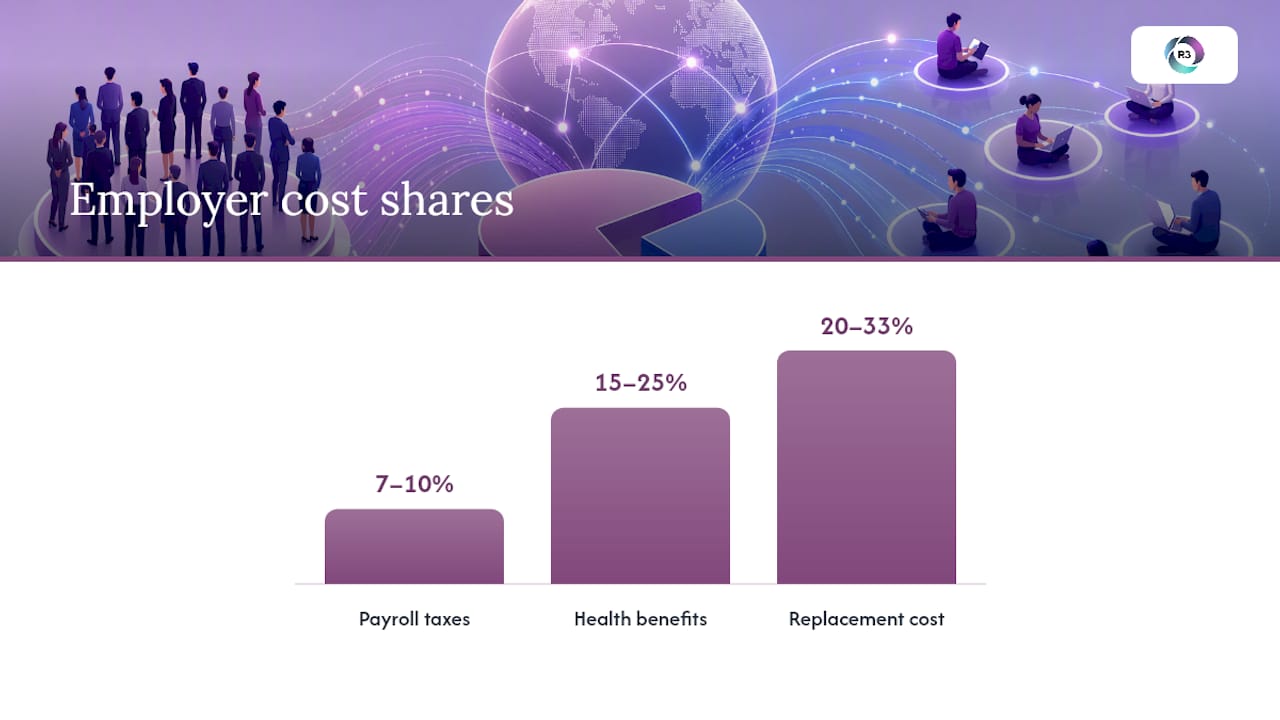
Payroll taxes (roughly 7 to 10% of salary)
Health insurance and benefits (often 15 to 25% of salary)
Paid time off and sick leave
Office space, equipment, and software seats
Recruiting and onboarding costs
Management and supervision time
Statistic callout: Replacing an employee costs employers an average of about $4,000 per recruit, climbing to roughly $7,000 for professional and managerial positions. Broader estimates from the Center for American Progress put total replacement cost at 20 to 33% of that employee’s annual salary once you include lost productivity and training time.
Now put a managed virtual staffing arrangement next to that. A virtual assistant handling the same administrative workload typically comes at a flat monthly rate that already includes management overhead, equipment, and a backup plan if that person leaves. You’re not budgeting for recruiting fees or unemployment insurance. You’re not covering a laptop or a corner of your office. For a deeper breakdown of what that monthly rate typically includes, R3source’s virtual assistant cost guide walks through real pricing tiers.
The bigger shift is who owns the risk. With a managed provider, recruiting, replacement, and bench coverage move to the provider’s side of the ledger. You stop absorbing the cost every time a role opens up.
Which Roles Actually Belong on a Virtual Team?
Not every job on your org chart is a candidate for virtualization, and pretending otherwise is how transitions fail. The roles that translate cleanly are the ones built around repeatable digital tasks rather than physical presence or split-second judgment calls.
Strong candidates for virtual staffing include:
Administrative support: scheduling, inbox management, data entry
CRM hygiene: updating records, cleaning duplicate entries, tagging leads
Transaction coordination for real estate and service businesses
Tier-1 customer support: answering common questions, routing tickets
Lead generation and appointment setting
Bookkeeping and invoice processing
Social media scheduling and basic marketing support
Some roles should stay in your building, as explained in this staff augmentation patterns for technical roles guide. Anything requiring physical presence, direct client trust built over years, or heavy regulatory sign-off (certain legal filings, licensed medical decisions, C-suite strategy) tends to lose more than it gains offshore. R3source’s decision framework for hiring a virtual assistant covers this in more depth.
Ask three questions before you decide: Is the task documented or documentable in an SOP? Does it require in-person presence more than occasionally? Does a mistake here carry legal or safety consequences? Two “no” answers usually clear a role for virtualization. Time zone overlap is worth planning for, too. Many businesses solve this simply by setting a few required overlap hours rather than full-shift alignment.
How Do You Actually Transition a Role to Virtual Staff?
A rushed handoff is the single biggest reason virtual staffing transitions stall out. The businesses that get this right treat it as a project with a start date, milestones, and metrics, not a same-day swap.
Audit the role. Track how the current employee spends their week for two to three weeks. Note hours per task, recurring bottlenecks, and which decisions require judgment versus which follow a fixed process.
Document everything. Build an SOP library covering logins, workflows, tone guidelines, and escalation paths. If a step lives only in someone’s head, write it down before that person leaves.
Set up access safely. Prepare credentials through a password manager, assign least-privilege permissions, and confirm which systems the new hire actually needs.
Run a pilot. Give the virtual hire 30 to 90 days with clear KPIs: tickets closed, response time, data accuracy, hours saved for the manager. Overlap the outgoing employee for 5 to 15 business days if one exists, so they can shadow and correct in real time.
Plan for replacement before you need it. Ask your provider what happens if the assigned VA leaves. A 24 to 72 hour bench replacement window keeps a resignation from turning into a crisis.
Pro Tip: Start with the task you complain about most, not the biggest role on your payroll. A messy inbox or a backlog of CRM cleanup gives you a fast, low-risk pilot before you touch anything client-facing.
Realistic timelines run four to six weeks from audit to a fully ramped virtual hire, longer for specialized roles like bookkeeping or medical billing. R3source’s integration best practices guide breaks the onboarding checklist down step by step.
What Keeps a Virtual Team Running Smoothly?
Integration is where most of the actual work happens, and it’s also where quality control either takes hold or quietly falls apart. The businesses that get the most out of virtual staffing treat onboarding as seriously as they would for any new department hire.
A solid onboarding sequence includes account setup, a documented SOP library the new hire can reference without asking constant questions, and a short shadowing period before they take on live work solo. From there, a predictable management cadence matters more than most owners expect: weekly check-ins, a simple KPI dashboard, and a clear escalation path when something goes sideways.
Security deserves the same rigor you’d apply to any employee touching sensitive data:
Signed NDAs before any account access is granted
Least-privilege permissions, not blanket admin rights
Monitored or logged work environments for sensitive tasks
Regular access reviews as roles and responsibilities shift
Trust signal | Why it matters |
Dedicated account manager | Gives you one point of contact instead of managing a freelancer directly |
Bench and replacement coverage | Keeps a resignation from becoming a service gap |
Structured training and QA cycles | Catches quality drift before it affects clients |
Documented SOP ownership | Preserves institutional knowledge when staff changes |
Clients who work with managed providers consistently report the same pattern: the account manager relationship and the replacement guarantee are what let them treat a virtual hire like dependable staff instead of a freelancer they’re gambling on.
What Legal and Compliance Risks Should You Watch For?
Classification matters more than most owners realize. Hiring a freelancer directly carries misclassification risk if you control their hours and methods too closely. Working through a managed provider shifts that employment relationship to the provider, which is one reason businesses lean toward staffing partners over solo contractors for ongoing roles.
Data privacy is the other pressure point. Before handing over CRM or financial access, confirm:
The provider requires signed NDAs and confidentiality agreements
Access follows least-privilege principles, not blanket permissions
Work happens in monitored, auditable systems
There’s a documented process for revoking access immediately if a placement ends
For anything touching healthcare data, licensed financial advice, or state-specific labor law, loop in legal or HR before finalizing the arrangement. A quick review upfront is cheaper than a compliance problem later.
What Would Your Own Numbers Look Like?
Run your own math before committing. Gather five inputs: current salary, benefits load as a percentage of salary, payroll tax rate, your last actual recruiting and onboarding cost, and the ramp time it took that role to reach full productivity.
A $50,000 administrative salary with a 20% benefits load and 8% payroll tax runs close to $64,000 fully loaded, before recruiting costs.
Add the $4,700 average cost-per-hire and a few weeks of reduced output during ramp, and the real first-year number climbs higher still.
Statistic callout: Against that backdrop, a managed virtual assistant handling the same workload often lands in a range that reflects the 60 to 80% cost reduction reported across industry benchmarks. Senior or highly specialized roles compress that gap, so run the numbers separately for anything beyond routine administrative work.
What I’ve Learned Watching These Transitions Succeed or Fail
The businesses that struggle almost always skip the audit step. They hand off a role verbally, expect instant fluency, and blame the virtual hire when gaps show up that were never documented in the first place. The ones that succeed start small: one repeatable role, a real SOP, a 30 to 60 day pilot with actual KPIs attached.
My rule of thumb is simple. Virtualize the task you’d hesitate to hire a full-time employee for tomorrow. If you wouldn’t post that job today, it’s probably your best starting point.
— Ellis
Ready to Replace That Role With Reliable Virtual Staff?
There are services built for exactly the transition this article walks through: moving a repeatable, SOP-able role off your payroll and onto a dedicated remote professional who’s trained, managed, and backed by a replacement plan if anything changes. These placements typically come with a dedicated account manager, structured training and QA, and bench coverage to prevent service gaps.
Clients typically come to us after running the math themselves: hours saved on management, overhead reduced without cutting output, and staffing that stays predictable month over month instead of swinging with the hiring market. If you’re weighing which role to move first, start with our offshore virtual assistant services page to see how the model works, or go ahead and book an introductory consultation to walk through your specific role and get a straight answer on fit and cost.
Sources
Recommended
Comments