

What Is Virtual Customer Support for Your Business?


Virtual customer support is the delivery of customer service through remote digital channels, including phone, email, live chat, social media, and AI-powered assistants, without any in-person interaction. The industry term for this model is remote customer service, though “virtual customer support” has become the widely accepted business shorthand. Digital channels like chat and email replace the physical service desk entirely, making location irrelevant to the quality of help a customer receives. For business owners managing lean teams, this shift is not a trend. It is a structural change in how customer relationships are built and maintained. Understanding what virtual customer support is, and how to deploy it well, is now a baseline requirement for any business serious about growth.
What is virtual customer support and how does it work?
Virtual customer support operates through a combination of cloud technology, digital communication platforms, and either human agents or AI systems working remotely. When a customer submits a question via chat, email, or social media, the inquiry is routed through a centralized platform to the appropriate agent or automated system. That routing happens in real time, regardless of whether your support team is in the same city or on the other side of the world.
The operational backbone of this model relies on a few key components:
Cloud-based platforms like Zendesk, Freshdesk, or Salesforce Service Cloud that centralize all customer interactions in one place
CRM integration that gives agents immediate access to a customer’s history, preferences, and previous issues
Omnichannel communication, which delivers consistent service across every channel a customer prefers, from SMS to social media
AI-assisted routing and response that handles high-volume, repetitive inquiries before a human agent is ever needed
Analytics dashboards that track resolution times, satisfaction scores, and agent performance in real time
Scalability is where this model separates itself from traditional in-house support. When your business grows or experiences seasonal spikes, you add capacity through software configuration and staffing adjustments, not by leasing more office space. Understanding the real role of virtual assistants in daily operations helps clarify just how much of this work can be handled remotely without sacrificing quality.
Pro Tip: Connect your virtual support platform directly to your CRM from day one. Agents who can see a customer’s full history resolve issues faster and with fewer escalations.

What are the primary types of virtual customer support?
Not all virtual support is built the same way. The right model for your business depends on your support volume, the complexity of your customer inquiries, and your budget. Three distinct types exist, each with clear strengths and trade-offs.
Human virtual support agents are remote professionals who handle customer inquiries just as an in-office team would, but from a dedicated home or shared workspace. Virtual assistants work as independent contractors), which means you eliminate costs tied to office logistics, employer taxes, and benefits. They excel at nuanced, emotionally sensitive interactions where empathy and judgment matter.
AI-powered virtual assistants and chatbots handle FAQs, order tracking, appointment scheduling, and other routine tasks automatically. AI virtual assistants handle routine support and escalate complex issues to human agents, which keeps response times low without requiring a large human team on standby.
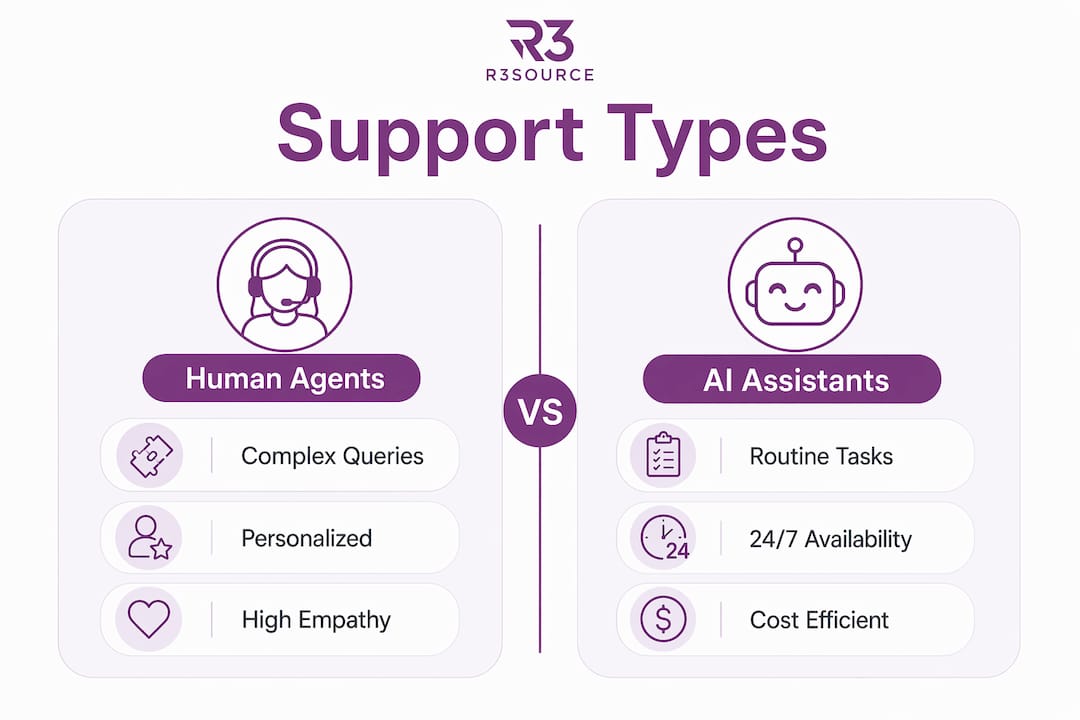
Hybrid models combine both. AI handles the first layer of contact, filtering and resolving simple queries, while human agents focus exclusively on complex or high-value interactions. This is the model most growing businesses find most effective.
Support Type | Best For | Key Advantage | Limitation |
Human virtual agents | Complex, sensitive inquiries | Empathy, judgment, relationship building | Higher cost per interaction |
AI chatbots | High-volume, repetitive queries | 24/7 availability, instant response | Limited on nuanced issues |
Hybrid model | Scaling businesses with mixed needs | Efficiency plus human backup | Requires thoughtful integration |
The hybrid approach reflects how AI and human agents complement each other best. Automating simple queries frees your human team to do the work that actually builds customer loyalty.
What are the key benefits of virtual customer support for businesses?
The performance data from 2026 makes the business case clearly. AI-driven virtual solutions reduce call wait times by 40%, increase operational efficiency by 25%, and improve customer retention by 15%. Those numbers represent real revenue impact, not just operational metrics.
Here is what business owners gain by adopting this model:
Lower staffing costs. Remote agents, particularly those sourced through offshore staffing partners, cost significantly less than in-house hires when you factor in salary, benefits, and overhead.
24/7 customer engagement. Continuous availability and personalization based on data analytics improve loyalty in ways a 9-to-5 support desk simply cannot match.
Faster response times. AI-assisted routing and pre-trained agents reduce the time between a customer’s question and a satisfying answer.
Better data visibility. Every interaction is logged, scored, and analyzed. You see exactly where your support process breaks down and where it performs well.
Scalability on demand. Add support capacity during peak periods without permanent hiring commitments.
Pro Tip: Use your support platform’s analytics to identify the three most common customer questions each month. Build dedicated scripts or AI responses for those questions first. You will resolve the majority of your volume with a fraction of the effort.
One misconception worth addressing directly: many business owners assume that moving support off-site means losing control. The opposite is true. Virtual systems provide data-driven insights that traditional in-office support rarely captures. You gain more visibility, not less. Exploring best practices for virtual assistant integration will show you exactly how to structure that oversight from the start.
How to implement virtual customer support effectively
Implementation succeeds or fails based on preparation. Businesses that rush the setup phase typically deal with inconsistent service quality and frustrated customers. Follow a structured approach instead.
Assess your current support volume and complexity. Document how many inquiries you receive weekly, what channels they come through, and how complex the average issue is. This determines whether you need human agents, AI, or a hybrid setup.
Choose your platform. Select a tool that integrates with your existing CRM and covers the channels your customers actually use. Zendesk, Freshdesk, and HubSpot Service Hub are three widely adopted options for small to mid-sized businesses.
Decide on your staffing model. Determine whether you will hire in-house remote agents, work with an offshore staffing partner, or rely primarily on AI automation. Most growing businesses benefit from using virtual assistants for growth as a cost-effective starting point.
Integrate your tools. Connect your support platform to your CRM, inventory system, and any other relevant software. Agents need complete context to resolve issues on the first contact.
Train your team on process, not just tools. Scripts, escalation paths, and tone guidelines matter as much as knowing how to use the software. Pre-trained remote staff reduce this burden considerably.
Monitor and adjust. Track resolution time, first-contact resolution rate, and customer satisfaction scores weekly during the first 90 days. Adjust staffing levels, scripts, and routing rules based on what the data shows.
The keys to long-term success are technology integration, data-driven personalization, and the flexibility to scale your support capacity as your business grows. Virtual support success factors consistently point to these three pillars across industries.
Pro Tip: Run a 30-day pilot with one support channel before expanding. Start with live chat, measure your resolution rate, then add email or phone once the process is stable.
Key takeaways
Virtual customer support delivers measurable efficiency, cost, and satisfaction gains when businesses choose the right model and implement it with clear processes.
Point | Details |
Core definition | Virtual support delivers customer service remotely via chat, email, phone, and AI tools. |
Three model types | Human agents, AI chatbots, and hybrid models each serve different business needs. |
Performance impact | AI-driven virtual solutions cut wait times by 40% and boost retention by 15%. |
Control improves | Data tracking in virtual systems gives managers more visibility than traditional support. |
Implementation order | Assess volume, choose a platform, staff appropriately, then monitor weekly for 90 days. |
Why virtual support is the smartest operational bet I’ve seen
I have spent years watching business owners delay this decision because they assume virtual support means lower quality. That assumption costs them money every quarter. The businesses I see thriving are not the ones with the biggest in-house teams. They are the ones that figured out which support tasks require human judgment and which ones do not, then built their model around that distinction.
The misconception about losing control is the one I hear most often, and it frustrates me because the data says the exact opposite. When every customer interaction is logged and scored, you have more accountability than any open-plan office ever provided. You can see which agents resolve issues on the first contact and which ones escalate unnecessarily. That level of visibility is genuinely hard to achieve with a traditional setup.
What I find most underrated is the retention benefit. A 15% improvement in customer retention is not a minor operational win. For most businesses, that number directly translates to revenue that would otherwise walk out the door. Virtual support, done well, is not a cost-cutting measure. It is a customer relationship investment that pays back consistently.
The businesses that hesitate longest tend to be the ones carrying the most manual workload. If you are still routing support requests through a shared inbox and relying on one or two people to handle everything, you are one bad week away from a service breakdown. Building a structured virtual support system now protects you from that risk while freeing your core team to focus on growth.
— Ellis
Scale your support with R3source
R3source provides dedicated offshore virtual assistants from the Philippines who integrate directly into your customer support operations. These are not task-based freelancers. They are trained, accountable remote professionals who show up consistently and represent your business with the same care you would expect from an in-house hire. Whether you need one customer service representative or a full remote support team, R3source builds the staffing solution around your actual needs. If you are ready to reduce overhead, improve response times, and build a remote team that scales with you, R3source is the partner that makes it happen.
FAQ
What is the definition of virtual customer support?
Virtual customer support is the delivery of customer service through remote digital channels including phone, email, live chat, social media, and AI-powered tools, with no in-person interaction required. It is also referred to as remote customer service in industry contexts.
How does virtual customer support differ from traditional support?
Traditional support relies on physical locations and in-house staff, while virtual support uses cloud platforms and remote agents or AI to handle inquiries from anywhere. Virtual models also provide real-time data tracking that traditional setups rarely offer.
What types of businesses benefit most from virtual customer support?
E-commerce companies, real estate firms, SaaS businesses, and service-based companies with consistent inquiry volume benefit most. Any business that handles repetitive customer questions or needs 24/7 availability is a strong candidate.
Can virtual support actually improve customer satisfaction?
Yes. Businesses using AI-driven virtual solutions see a 15% improvement in customer retention and a 40% reduction in call wait times, both of which directly improve the customer experience.
What is the best way to start with virtual customer support?
Start by auditing your current support volume and identifying your most common inquiry types. Then select a platform like Zendesk or Freshdesk, choose a staffing model, and run a 30-day pilot on one channel before scaling across all touchpoints.
Recommended
Comments